How to use VocabSpark
The method behind the app, and how to get the most out of it.
Who this is for
Australian students roughly 8–18, and the parents and tutors who sit beside them. Primary school reading support, OC and Selective test prep, NAPLAN vocabulary, ESL learners, and adult learners building fluency. Not: cramming for tomorrow's quiz, or anyone expecting Duolingo-style gamification. VocabSpark is a slow, honest method — if that matches how you want your child to learn, it'll fit.
The idea, in one paragraph
Flashcards and word lists teach recognition, not ownership. Kids "know" a word on Friday's test and can't use it on Monday. VocabSpark is built around the problem that sticking beats seeing: every word is carried up a five-level mastery ladder through Lessons, Tests, and Challenges, then kept there by coming back to it. Everything in the app serves that ladder.
Learning · Levels 1–2. Open a Lesson. Wordly Wise–style sections teach the word in context — definitions, examples, synonyms, word forms.
Familiar · Levels 3–4. Prove it. The Test at the end of the lesson, then Challenges — True/False, Word Forms, Multiple Meanings, and Reading passages — each nudge the word up the ladder.
Mastered · Level 5. The word is yours. But not forever — leave it alone too long and it decays back toward Familiar. That's by design, and it's how real vocabulary sticks.
Games are a side dish — fun, fast reps to keep younger students engaged between lessons. They're not on the ladder, and that's OK.
The honest bit: VocabSpark doesn't measure how many words you've seen. It measures how many you've kept. Word counts are noise; the mastery ladder is the signal.
Why VocabSpark
Three things make VocabSpark different from the flashcard apps and word lists your child has probably already tried.
1. Wordly Wise–style lessons with sentences kids actually read
Every word comes with its definition, synonyms, antonyms, word forms, and a real sample sentence — not a fill-in-the-blank stub. Here's how a handful of words from the OC Test Prep pack appear in the app:
- ordinary — "What started as an ordinary day turned into an exciting adventure."
- reveal — "The magician was ready to reveal the secret behind the trick."
- hollow — "The squirrel stored acorns in the hollow tree trunk."
- tangled — "The tangled vines made it hard to walk through the jungle."
Every section of every lesson is built this way: concrete sentences, memorable contexts, words that live in scenes your child can picture.
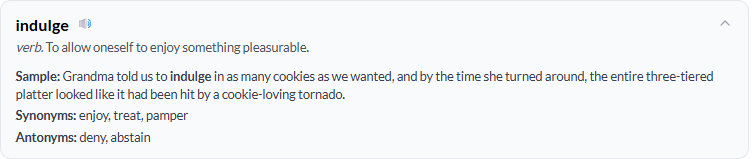
But that's only the first step. VocabSpark doesn't just teach indulge once — it cycles the same word through six different lesson activities, each asking the student to use it a different way:
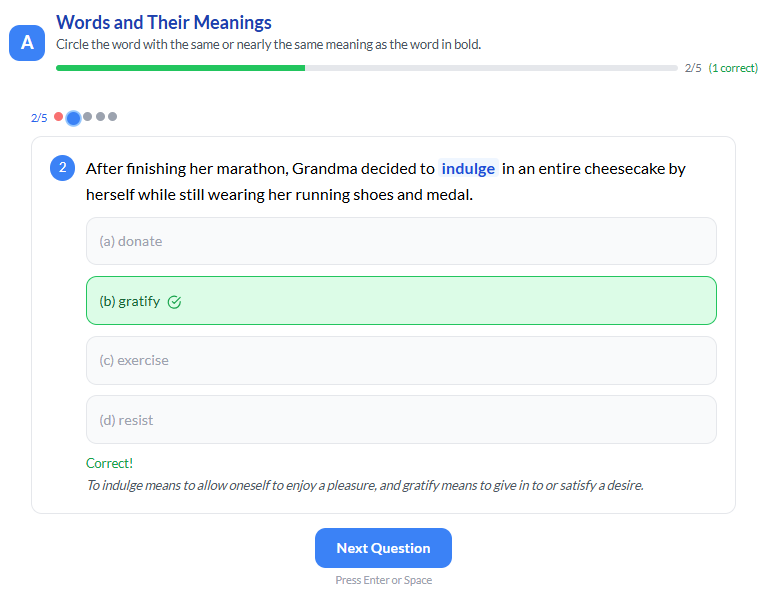
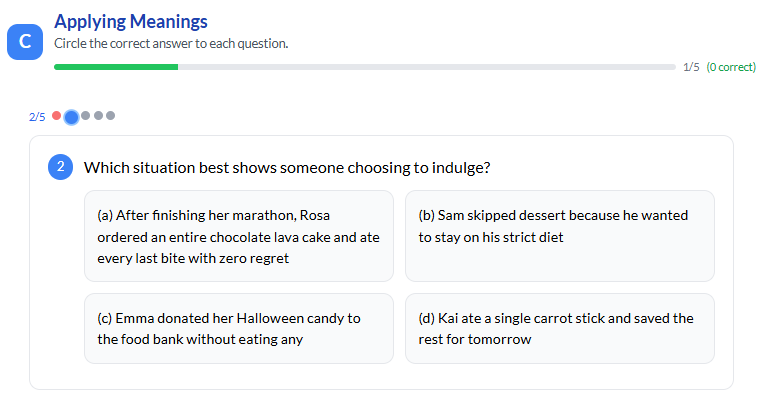
The takeaway: a VocabSpark lesson isn't one screen with one question — it's the same word seen from several angles in the same sitting. That's why the words stick.
Want to see the real thing before signing up? Browse our sample lessons — they're real printable PDFs, the same format your child would work through in the app or on paper.
2. Words that don't stay learned aren't learned
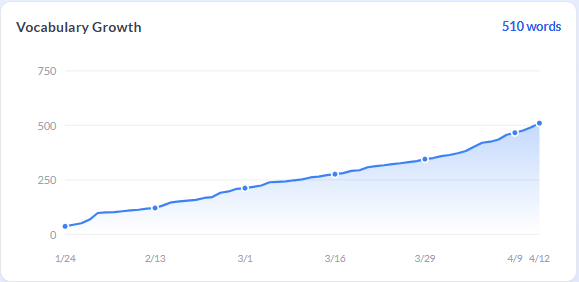
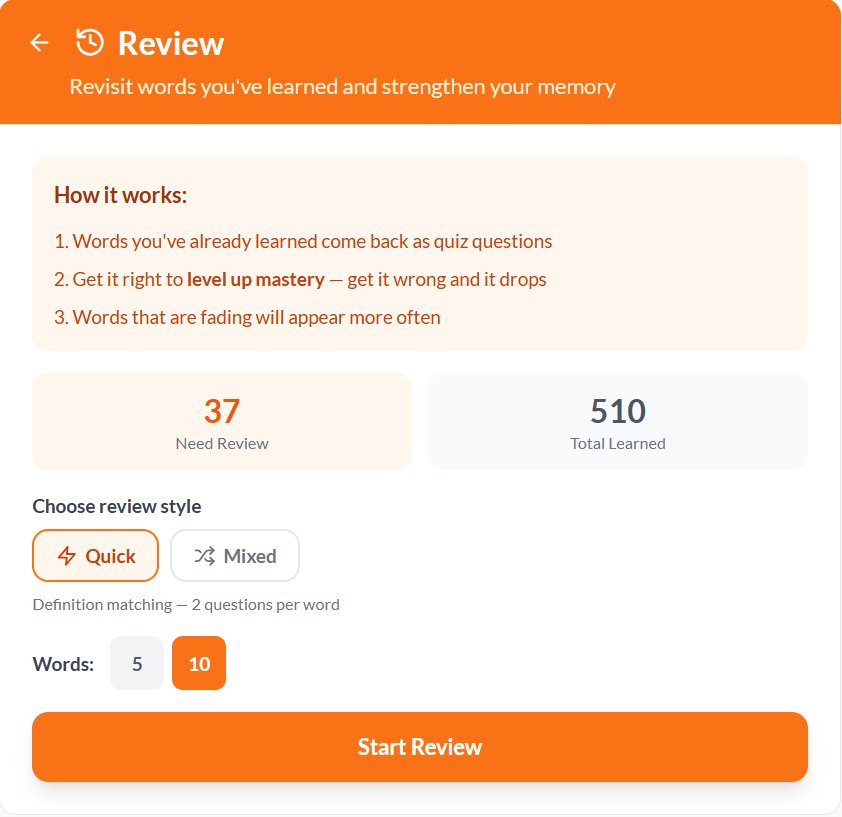
Most vocab apps count how many words you've seen. VocabSpark tracks how many you've kept. Every word in your vocabulary has a quiet decay timer — if you don't meet it again for a while, it slides back down the ladder and VocabSpark asks you to review it. It's how your brain actually works, and it's the difference between "I saw that word once" and "I can use that word in a sentence next month."
3. Curated packs, carefully cleaned
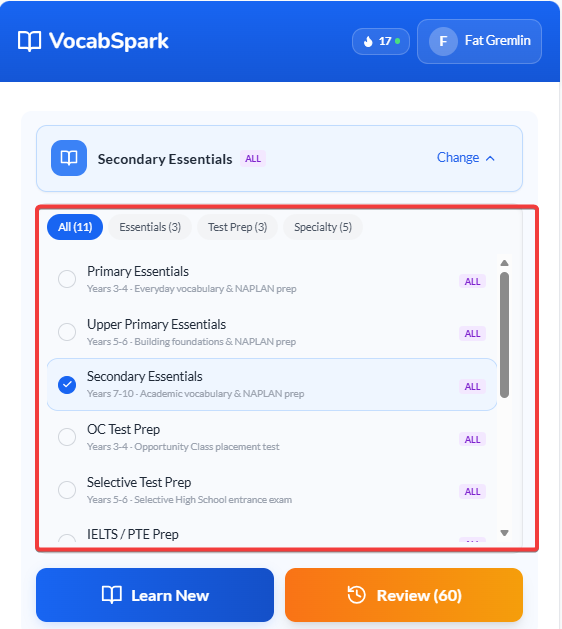
500 well-chosen words beats 10,000 random ones. Every VocabSpark pack is hand-curated for a specific audience — Year 4 OC, Year 6 Selective, IELTS, Business English — and every pack has been cleaned: too-easy filler words removed, old-fashioned vocabulary cut, and anything inappropriate (adult themes, violence, outdated references) taken out. What's left is the right words for the right learner, with no awkward surprises when your child is learning alongside you.
Ready when you are
If the method makes sense, the honest next step is to try it. No credit card, no demo calls — just sign up and start a lesson.
Built by parents in Sydney, for Australian kids.
Making it work in real life
Two ways to fit VocabSpark around a normal family's day — without carving out another "sit-down study" block nobody has time for.
📱 Use fragment time, not scheduled time
VocabSpark is fully mobile-optimised. Ten minutes waiting for a table at dinner, a train ride, a quiet stretch at the beach — these are the moments the app was built for. A single lesson fits into the gaps of a normal day, and the ladder moves forward whether you sat down for it or stole five minutes between other things. Most of VocabSpark's heaviest users never plan a "study session" — they just reach for the phone whenever life hands them a pause.
🖨️ Print a PDF for off-screen time
Every lesson can be exported as a printable PDF. Print one in the morning and leave it on the kitchen bench — your child can work through it with a pencil at the dining table, in the car, or on a weekend away without the phone. Same words, same Wordly Wise–style sections, zero screen time. Great for parents who want their kids learning but not staring at another device.
Curious what a printed lesson actually looks like? Browse our sample lessons — the PDFs you'd print at home.
The mastery mental model, in one line
You've seen the ladder on the Visitor tab. Here's the practical version for parents: every word your child has learned sits somewhere on a five-level ladder grouped into Learning → Familiar → Mastered. A healthy week shifts words up the ladder; untouched words slowly decay back down. When you read the dashboard, that's what you're looking at — and it's the only number that really matters.
Picking the right word pack
Packs are grouped into five categories. If you already know your child's year level and whether they're preparing for a test, here's the 5-second answer — then the detailed breakdown below if you want to read more.
| If your child is… | Start with |
|---|---|
| Years 3–4, general school support | Primary Essentials |
| Years 3–4, doing OC prep | OC Test Prep + Primary Essentials |
| Years 5–6, general school support | Upper Primary Essentials |
| Years 5–6, doing Selective prep | Selective Test Prep + Upper Primary Essentials |
| Years 7–10 | Secondary Essentials |
| ESL learner, any age | ESL Essentials |
| Adult — academic / workplace / idioms | Academic / Business / Idioms |
Want to understand why each pack is recommended? Keep reading.
📗 Essentials — core school vocabulary
These mirror the words kids meet across normal school subjects, grouped by the stage they're at.
- Primary Essentials — Years 3–4. Foundational academic vocabulary; the words starting to appear in classroom texts and homework. Best if your child is in early primary and you want to get ahead of the reading curve.
- Upper Primary Essentials — Years 5–6. The bridge pack — stronger vocabulary from chapter books, comprehension tests, and NAPLAN-style reading. Best for confident readers not yet doing selective prep.
- Secondary Essentials — Years 7–10. High school–level vocabulary for subject reading and essay writing. Best for high schoolers who want to sound sharper in written work.
🎯 Test Prep — for specific exams
These are narrower and denser. Don't start here casually — pick one because your child has a specific test in sight.
- OC Test Prep — Year 4 students preparing for the NSW Opportunity Class placement test. Vocabulary matches the style and difficulty of past OC papers.
- Selective Test Prep — Year 6 students sitting the NSW Selective High School test. Harder than OC; includes analogy and comprehension vocabulary selective papers love.
- IELTS / PTE Prep — older students and adults preparing for IELTS or PTE Academic. Academic word list coverage with test-weighted definitions.
🌏 ESL — English as a second language
- ESL Essentials — learners whose first language isn't English. Simpler explanations, higher-frequency words, less idiomatic. Good for new arrivals building everyday fluency, any age.
🔬 Subject — cross-curricular vocabulary
- STEM & Humanities — vocabulary kids need to read textbooks, not just pass vocab tests. Science, history, geography terms across subjects. Best as a supplement alongside an Essentials pack, not a replacement.
💼 Adult — workplace and further study
- Academic English — university-level academic vocabulary. For students heading into tertiary study or adults writing reports and papers.
- Business English — workplace vocabulary for meetings, emails, and presentations. For adult learners in professional settings.
- English Idioms — phrases that don't translate literally ("break the ice," "hit the nail on the head"). For adult learners who understand English but want to sound more natural.
A quick rule of thumb: pick one Essentials pack that matches your child's year as the backbone, and add a Test Prep pack only if there's an actual test on the horizon. More packs isn't better — depth on the right pack beats breadth across many.
Setting up Family plan
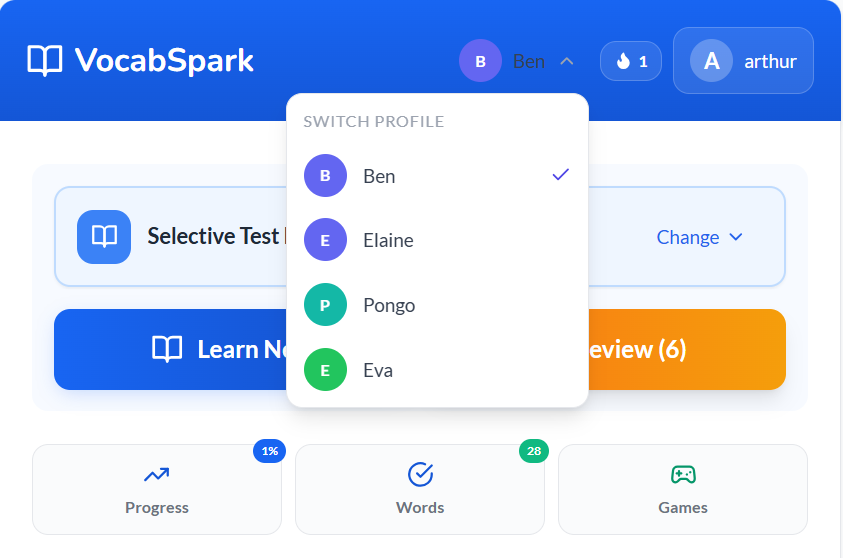
Family plan turns one subscription into a separate learning account for each child — up to six kids on the one bill. Each profile tracks its own progress, mastery, and learned words, and has its own learning preferences: word count per lesson, kid-friendly definitions, decay mode, even its own review schedule. A Year 4 OC candidate and a Year 8 high schooler can share the same family subscription without stepping on each other's ladders.
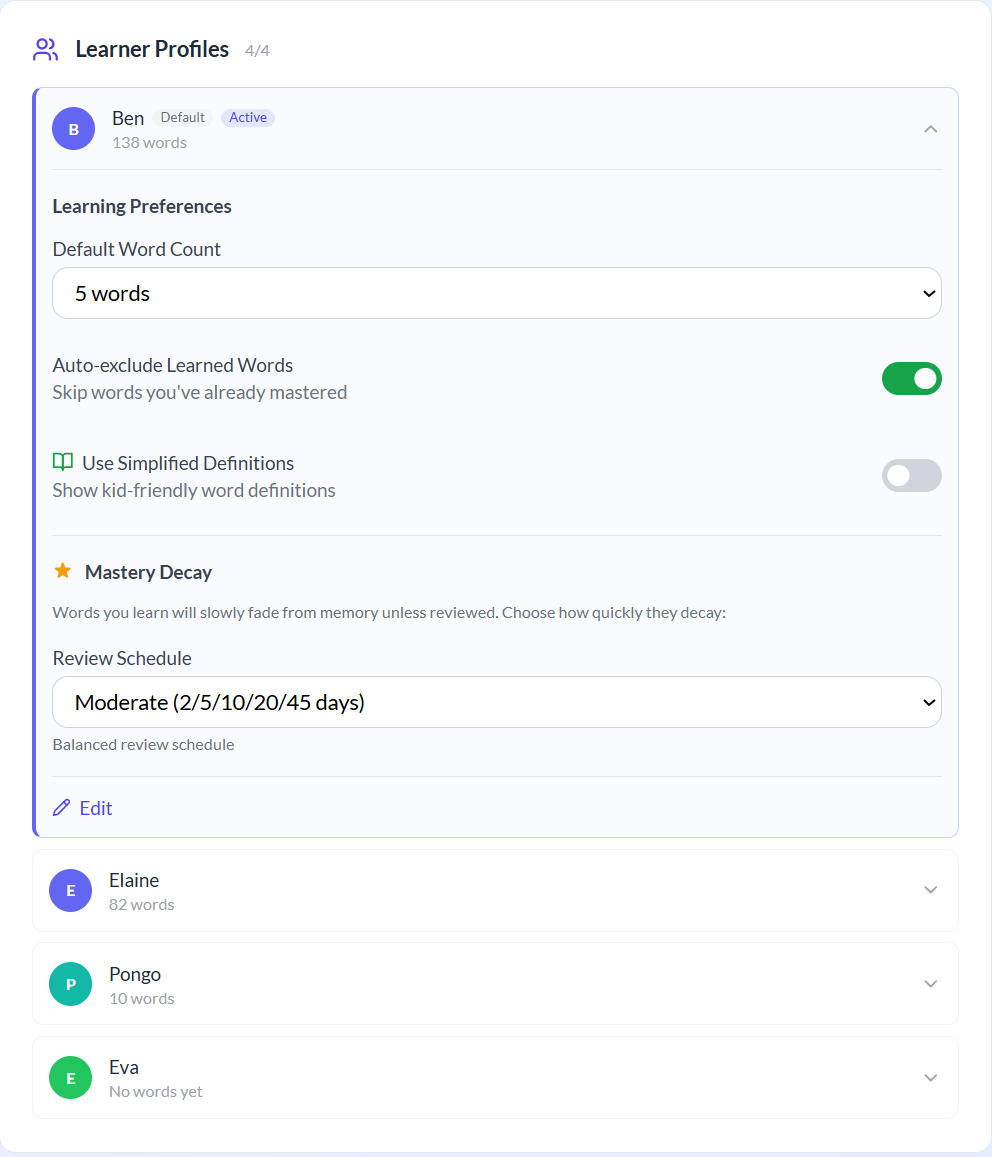
Switching between profiles is a one-tap affair from the app header. Tap the current profile name at the top and pick whichever child is about to use VocabSpark — the dashboard, review counter, and learned-words list all re-scope instantly to that child.
Reading the Progress dashboard
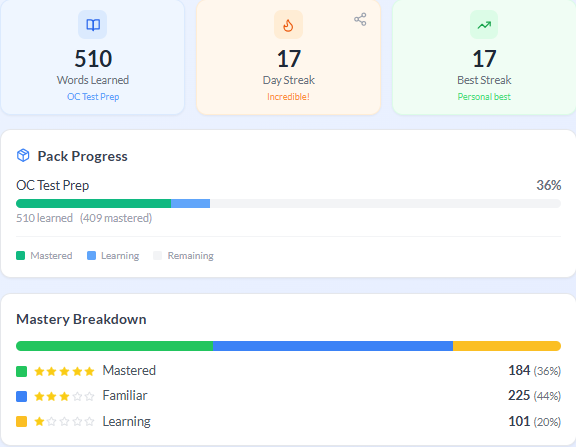
The Progress dashboard shows a few different numbers. Here's which ones are actually worth watching.
Mastery climbing is the real signal. Streak length tells you your child has a habit, not how much they're learning. Word count tells you how many words have been seen, not how many have stuck. The Mastery Breakdown and the Growth chart are the honest pictures.
How to see what your child learned on a specific day
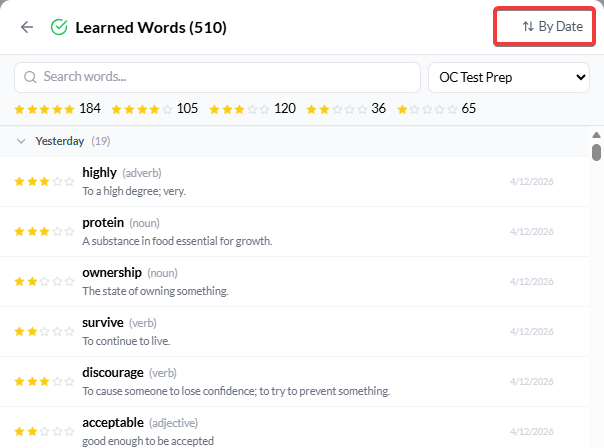
Open the Learned Words list and use the "By Mastery / By Date" toggle at the top to switch to date order. Words are then grouped by the day they were learned — scroll to any day to see exactly which words crossed into your child's vocabulary on that date.
When things stall
Every family hits a stretch where something isn't working. Here's what's usually going on and what to try.
Mastery stopped climbing this week
Usually means review words are piling up and dragging older mastery scores down. Have your child clear the review counter first before starting anything new — two minutes a day is enough. The ladder should start moving again within a few sessions.
Kid avoids the Challenges, only does easy sections
Challenges are meant to feel harder than the lesson — that's how they push mastery up. If your child is ducking them, sit with them for one Challenge session and talk through a few questions together. Once the fear breaks, they usually keep going on their own.
Kid speed-clicks through Lessons without reading
Classic pattern — they want to "get it over with" and don't realise the lesson itself is the learning. The fix isn't nagging; it's switching to the printable PDF for a week. Same words, same sections, but without a tap-to-advance button they naturally slow down and read.
Kid refuses to open the app
Don't push it into a daily battle. Drop the target to three lessons a week, pair it with something they already enjoy (car trips, waiting rooms), and let the habit rebuild from smaller. Momentum beats volume with reluctant learners.
Settings worth knowing
Two settings are worth reviewing once per child.
Kid-Friendly Definitions — simpler wording for younger readers. Toggle in Settings. Worth turning on for Year 3–5; turn off once your child is comfortable with the regular definitions.
Mastery Decay Mode — controls how fast mastered words fade if untouched. Gentle, moderate, or aggressive. Pick gentle if your child uses the app a few times a week; aggressive if they're daily and you want the ladder to stay honest.
Learn smarter, not longer
Here's what you're actually working toward: in a month, you'll start noticing the words you learned here in books, movies, teachers' handouts — and it'll feel like you're in on a secret. In a year, your essays will sound sharper, your vocab quizzes will feel easy, and you'll know words most of your friends don't. The seven habits below are how you get there. None of them take long. None of them are hard.
1. Start with your review words, every time
Clear the orange number first. That's the rule.
When you open VocabSpark, look at the top of the Review screen. You'll see a number like "37 Need Review" in an orange card. Those are words you've already learned that are about to slip away. Clear them before you start anything new — tap Start Review, pick Quick or Mixed, do five or ten words, done. Two minutes. Everything else you learn today is wasted if you let old words fall off the ladder at the same time.
2. A little bit every day beats a lot sometimes
Don't binge 30 lessons on a Sunday. It literally doesn't work.
Fifteen minutes today and fifteen minutes tomorrow will teach you more than a whole hour on Sunday. Your brain needs the gap between seeing a word and seeing it again — that's actually when the word gets saved. Doing ten lessons in one sitting feels productive but the words evaporate before Monday. Notice how VocabSpark caps you at 10 lessons a day? That's not an accident. It's the app forcing spacing on you because spacing is the whole point.
3. Do the lesson properly the first time
Don't speed-click Sections A, B, C, D. The lesson is the learning.
Every lesson has Sections A, B, C, D (and sometimes F and I) — that's not filler, that's the whole point. Section A teaches you synonyms. Section B asks you to replace a phrase with the right word. Section C is where you have to pick which situation the word actually fits. Each one asks your brain to use the word a different way — and that's what makes it stick. The test at the end is just a check that the lesson worked. If you speed-click to get to the test, the test will be the first time you saw the word — and you'll fail it and have to start over.
4. When you get a word wrong, don't rage-retry
Don't hammer the same question ten times. Just move on.
When you pick the wrong answer, you'll see a red Not quite message with a short explanation, and the word's mastery stars will drop by one. That's not punishment — it's the app finding a word you don't fully own yet. The worst thing you can do is rage-retry the same question ten times in a row. Instead, read the explanation, move on, and let the word come back to you in tomorrow's review. Falling and climbing is literally how the ladder works — you can't reach Mastered without some wrong answers along the way.
5. Challenges are supposed to feel harder
If a Challenge feels too easy, you're not learning anything from it.
The Challenges — True/False, Word Forms, Multiple Meanings, and Reading — are meant to be trickier than the lesson. Reading Challenge in particular shows you a whole passage and asks you to figure out what the word means from context, which is the hardest thing you can do with a word. That's the one that pushes you from Familiar to Mastered. Don't avoid them just because the True/False ones feel easy — do the hard ones too. Stretched is the point.
6. Check your Progress page once a week
Don't watch the streak — watch the Mastery Breakdown climb.
Once a week — Sunday night is a good time — open the Progress page. Look at the Mastery Breakdown (the amber/blue/green bar). Ask yourself: how many words moved from Learning into Familiar this week? From Familiar into Mastered? Those are the numbers that matter. The streak tells you whether you have a habit; the word count tells you how many words you've seen. The Mastery Breakdown tells you how many you actually own. Watching that green bar grow is honestly the best reason to keep going.
7. Mastered doesn't mean finished
Don't assume a word is yours forever. Come back and say hi sometimes.
Even words you've climbed all the way to Mastered can fade if you don't meet them again for a while — that's what the review counter is catching. It's not the app being mean; it's how real memory works. Every time you clear the orange review number (Habit 1), you're keeping the words you already worked hard to master. That's why Habit 1 is Habit 1.
That's the whole method. Seven habits, fifteen minutes a day, and in a month you'll notice words you've mastered showing up in books, movies, teachers' handouts — like you're walking around with a superpower nobody else knows you have. Want to play a Game of Memory Match or Word Connect sometimes instead of a full lesson? Go for it — the words still get a little warmer, and honestly, you earned it. Just don't skip Habit 1 on the way there.